Your agents forget everything. Pylon remembers.
Pylon is the desktop workspace where Claude Code, Codex, Gemini, and local models share the same neural memory, the same plans, and the same execution state — with on-device vector embeddings that get smarter the more you use them, no API calls required.
Run every task in its own git worktree, keep terminals alive, review changes in-app, and let Pylon's semantic memory engine turn your repo knowledge into a compounding asset — decisions, bugs, constraints, and workflows surface automatically, even when the wording is completely different from the original note.
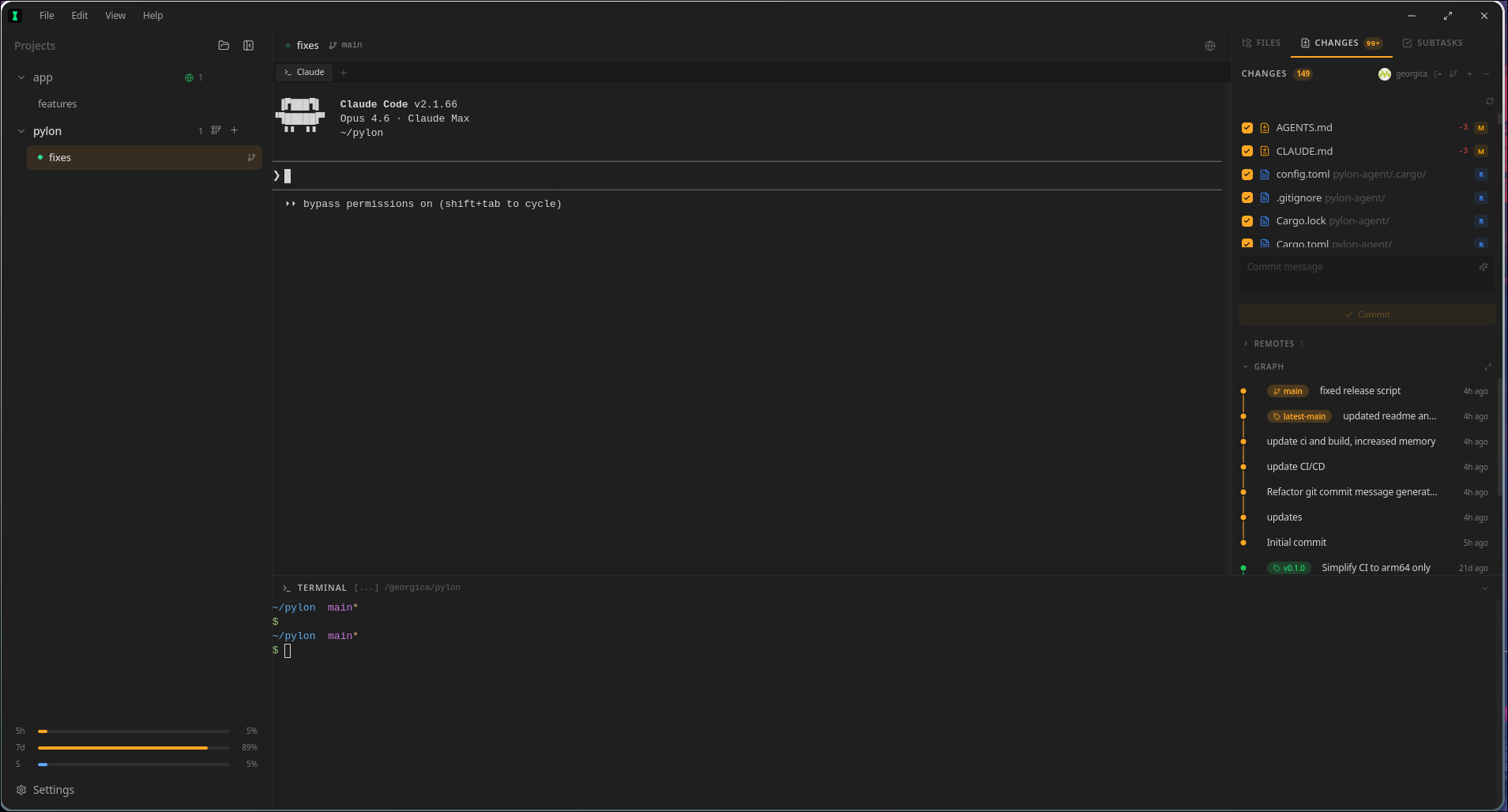
Features
An intelligence layer your agents actually keep
Pylon replaces the usual pile of terminals, chat windows, scratchpads, and ad-hoc notes with one operating surface for multi-agent development — backed by a neural memory engine that compounds knowledge across every session, every agent, and every task.
Neural Vector Memory
On-device ONNX embeddings via all-MiniLM-L6-v2 give every memory a real semantic vector. No API calls, no cloud dependency — your project knowledge stays local and private.
Reciprocal Rank Fusion
Search fuses four independent signals — neural similarity, lexical matching, temporal recency, and importance profiles — so the right memory surfaces even when wording differs.
Auto-Decay & Self-Cleaning
Stale memories decay in importance automatically. Unimportant entries get archived. The knowledge base stays lean without manual cleanup.
Memory Consolidation
Related memories are automatically clustered by embedding similarity and merged into concise high-quality entries, keeping the knowledge base dense and useful.
Semantic Duplicate Detection
New memories are compared against existing ones using cosine similarity. Near-duplicates get merged instead of creating noise — agents get a merged action back so they know what happened.
Multi-Agent Workspace
Put Claude Code, Codex, and Gemini on the same task without splitting your workflow across separate apps and disposable terminals.
Shared MCP Knowledge
Every agent sees the same neural memories, plans, subtasks, notes, and repo context through the built-in pylon-knowledge MCP server with semantic search.
GitHub Auth That Sticks
Sign in once. Pylon keeps GitHub auth usable across device flow, stored tokens, HTTPS remotes, and SSH remotes.
Built-In Local LLM
Download GGUF models, test them in-app, and keep a local model library without wiring together extra tools yourself.
Choose the Assistant Model
Pick the exact local assistant model you want for task assist, repo-context summaries, and sidebar chat instead of reconfiguring constantly.
Git Worktree Isolation
Each task gets its own branch and worktree, so agents can move fast without stepping on each other or trashing your main checkout.
Remote SSH
Point Pylon at a remote box and keep the same agent workflow over SSH, with reconnect behavior and session recovery built in.
Subtask Scheduler
Turn plans into a shared execution checklist and keep every agent aligned on what is next, blocked, or done.
Sidebar Plan Viewer
Open shared plans from the sidebar in a focused markdown viewer, so execution stays close to the plan instead of buried in chat history.
Project Notes Workspace
Keep durable project notes in one shared place, visible to every agent working that repo instead of scattered across prompts and scratch files.
Query Expansion
Search automatically expands queries with terms from the active task title and notes, so agents find the right memories even when the wording differs from the original.
Sidebar Local Chat
Ask your local model for task-aware help from the sidebar without leaving the repo, the plan, or the current execution context.
Shared Timeline & Handoffs
Track work in one timeline and hand tasks between agents cleanly, without rewriting the same status update over and over.
File Editor & Git UI
Review diffs, inspect the commit graph, link issues, and ship from the same workspace where the agents did the work.
Multi-Project Tasks
Run many repos and many tasks without collapsing everything into one giant terminal session or one overloaded agent thread.
Resilient Terminal Sessions
Restarts, tab switches, and reconnects do not wipe the working state you needed to keep momentum.
Monaco Editor Everywhere
Plans, notes, and subtask details render in embedded Monaco editors with full syntax highlighting and markdown support — not plain text blocks.
Cross Platform
Available for macOS, Linux, and Windows with native performance on every OS.
Workflow
From repo to shipped change
Pylon gives each task isolated git state, persistent terminals, shared plans, durable notes, and a neural memory engine that compounds knowledge across sessions instead of resetting every restart.
Open a project
Bring in a local repo or attach a remote server over SSH without changing the workflow.
Create a task
Each task gets its own worktree, branch, and agent tabs so experiments stay isolated and reversible.
Run your agents
Open Claude Code, Codex, and Gemini side-by-side. They all inherit the same shared context instead of starting from scratch.
Build neural project memory
As work progresses, Pylon embeds every memory with on-device ONNX vectors, detects and merges duplicates automatically, decays stale entries, and consolidates related knowledge — so the next task starts with a clean, high-signal context.
Enable local AI
Download a GGUF in Settings, pick a default assistant model, and add a private local model to the same workflow.
Plan and execute
Create a plan, open it from the sidebar, break it into subtasks, and execute against one shared operating picture.
Capture working notes
Use the Notes tab for project-scoped markdown notes that survive handoffs and keep the repo-level context stable.
Review and ship
Review changes, inspect the commit graph, use local chat when needed, and ship without leaving the workspace where the work happened.
MCP Server
A shared brain that self-maintains
Pylon runs a built-in MCP server named pylon-knowledge with neural vector search, automatic garbage collection, and memory consolidation. It gives Claude, Codex, Gemini, and local AI the same high-signal memory — and it gets cleaner and sharper the longer you use it, without manual curation.
Desktop orchestration
Pylon preload + main process
stdio JSON-RPC
pylon-knowledge MCP server
Persistence
knowledge.db + ONNX neural vectors + imported rule files
Neural memory engine
Embeds memories with on-device ONNX vectors (all-MiniLM-L6-v2, 384 dims), searches with Reciprocal Rank Fusion across neural, lexical, recency, and importance signals. No API calls — everything runs locally.
Self-maintaining knowledge
Detects and merges semantic duplicates on write, decays stale importance over time, archives noise, and consolidates related memories into dense high-value entries.
Session bootstrap
Builds task-scoped briefings, compact session context, and project quick references so agents can resume work with the right subtasks, memories, notes, and file context.
Shared execution state
Stores plans, subtasks, task notes, and scoped memories so every agent sees the same operating picture and handoffs are seamless.
History and recovery
Keeps version history for memories, including deleted entries, so agents can inspect prior snapshots and restore important context.
File awareness
Tracks explored files, cached summaries, and freshness checks so agents can skip unchanged files and focus only on what actually moved.
Repo context
Provides code search, context packs, and quick project references without forcing each agent to rediscover the repo.
Download
Install the workspace built for multi-agent coding
Free and open source. MIT licensed. Use it when you want agents, terminals, plans, notes, project memory, and git execution to live in one place instead of a pile of disconnected tools.
macOS
Not available yet
Coming SoonLinux
Not available yet
Coming SoonWindows
Not available yet
Coming Soon